Should learning pros shift from sector specific tools? #3 : “creator” all-in-one platforms (over an LMS)

A bit of background on the learning side

This bit is an attempt to think where we (i.e. the learning industry/industries) currently are with ‘platforms’…

Learning management systems (LMSs), love them or hate them, remain the core component of many learning environments – be that workplace learning and development (L&D) or in education (where virtual learning environment, or VLE, may be the preferred term dependent on geography). Many LMS/VLE are built, at least initially, from the point that a common product, a ‘course’, is at their heart.

Even the rise of the Learning Experience Platform (LxP/LXP) has not shifted the need, for many, of an LMS. Indeed the lines that separate an LMS and an LXP are blurred at best – “there is no hard and fast distinction“. Continuing use cases for an LMS include that they often remain the single source of truth for compliance records, the ‘one stop shop’ for organisational learning opportunities, a walled garden for education and much more. Whilst LMS/LXP/VLEs come in many shapes and sizes they have, in many ways, replaced or reinforced the ‘learning by location’ model – i.e. you used to learn in a classroom now you learn in/via this technology or simply register for in-person events via it.

Coaching, mentoring and other less formal and location defined learning experiences are supported to differing degrees by the wide range of LMS/VLE/LXP that are out there in the market. The learning sector in the last c.20 years has arguably fluctuated somewhat in how much an LMS should be an ‘all-in-one’ tool with, at times, it being simply a launch pad for SCORM and other content whilst at other times there has been a push for talent management, discussion, social learning, knowledge management and much more (that have separate specialist tools/markets) to be included in core LMS functionality. Today we tend to see platforms that may not offer all this functionality but will integrate with other tools, for example via integrations, APIs, etc. These integrations often developed via acquisitions by the tech vendors themselves.

Creator platforms

So on to the point of this blog – some reflection on another market segment I am new to, having only just realised in the last couple of weeks that such things exist.

Previously I presumed most people monetize their ‘creator’ work through the relevant platform (YouTube, a photo site, WordPress or whatever) in combination with services such as Patreon. However, there appears to be another model that has developed via ‘creator platforms’.

Podia is one of the tools that clearly see themselves in this space. They split their own functionality “sell your work” and “market your work” functionality, interesting the sell aspects include online courses, webinars and other functionality that will be familiar to many learning pros. The below video is seemingly a pretty honest self-assessment on their part, comparing themselves to another major player in this space (do let me know if there are other tools worth looking at):

So is Podia an option for learning pros?

As is often the case, it really depends on what you already have and use. However, if you were looking to break from, say, a Moodle with sales plugins, with separate CRM, video hosting, etc to move into a (potentially) simpler all-in-one solution this seems like a realistic option.

Your online course, your way.

Choose from a variety of online courses that fit your business and customers’ needs; we support every file type, host all of the content, and never place limits on how much content you can upload and sell to your students.

https://www.podia.com/features/sell-online-courses

Is Podia really a learning platform?

In many ways Podia is quite a traditional solution for learning pros in that a “course” remains a unit of transaction, i.e. you buy access to a course. The platform lets you sell these via one of a number of temporal-based formats such as standalone, timed release, cohort based, etc.

In terms of content you are effectively talking about adding links to content and uploading media. This is clearly not SCORM focused like a traditional LMS but is no different to how many LMS are used, for example the traditional complaint that university online learning platforms are used as “file stores”. That said, Podia as a file store approach is quite appealing considering there are “zero limits on content…as much as you want to as many people as you can.” Many of us will have horror stories about eLearning systems falling over in the past when used at scale so Podia seems to have a lot of potential here.

There are other functionality options beyond static content, including borrowing from the traditional approaches of the learning space:

Ensure your course students are truly understanding your material with a multiple-choice quiz at the end of your lessons.

https://www.podia.com/features/sell-online-courses

Obviously a MCQ is far from ensuring ‘true understanding’ but I guess it at least separates a tool like Podia from something like, say, WordPress for hosting your content (yes, I know there are lots of WordPress plugins!).

Beyond the content and MCQs the more interesting element may well be that more social learning is possible via community elements and webinar integration. It is perhaps worth noting here though that Podia’s “all-in-one” would still need to connect external accounts for the webinar functionality itself:

Podia integrates with both YouTube Live (all plans) and Zoom (Shaker/Earthquaker) to let you offer webinars to your audience.

https://www.podia.com/features/sell-webinars

Conclusions

Overall, these platforms seem to offer another option for those who work in learning. By creating a ‘community’ around our work there is a different model here than the traditional LMS – be it if these were used internally to an org or for the sales-based models they are clearly intended. One market that clearly could look in this direction would be Membership based organisations who effectively have existing communities and are, in some ways, the traditional “creator” organisations due to their model of sharing useful resources, links, courses, encouraging knowledge sharing, etc for bodies interested in a topic. If the costs are worthwhile for such an organisation will clearly depend on the alternatives and existing IT setup, resources, platforms in use, etc.

Should learning pros shift from sector specific tools? #2 : Weet for video based communication

That I have not been to any conferences or other in-person events for at least a couple of years might be why I seem to be stumbling across a few new tools of late. In the last couple of weeks this has included Weet.

Are you already using Weet for learning related projects? If so, let me know.

Weet offers browser based video recording with very easy webcam over screen share functionality. Obviously similar functionality exists in Teams, Zoom and elsewhere – indeed one of my few paid for apps is Screencastify which has some similar functionality. Where Weet is powerful is that the webcam video can make use of their virtual backgrounds (ala Teams and Zoom) within the browser based recording.

Weet themselves do a good job here for explaining its benefits for learning so education/learning is clearly a market they are aiming for. Therefore, they are targeting market share from some of the more sector specific tools such as Camtasia.

The Teams integration (I haven’t tried this) offers an easy way to communicate, share video, etc without having to do the slightly counter-intuitive Teams approach of having single person “meetings” to record video messages.

A very nice feature of Weet is that even on the free plan you can download your recordings. Therefore, if you have concerns over their hosting (which can be a private or public link) you can download and host/share on/via your own systems. The free plan caps you at a 8 minute video which, in all honesty, is probably as long as most videos should be anyway.

Obviously lots of use cases as part of async communication – in education video based feedback would be an obvious example.

Here’s a quick video I did for my LinkedIn profile.

More generally, are we seeing a move back towards browser based tools? It feels a little like this to me, with less emphasis on Apps, or maybe I am just imagining that?

StreamYard: the streaming tool we’ve been waiting for?

So, I am not sure how I became aware of it initially but I have been giving StreamYard a go.

What is StreamYard?

Basically you can Stream live, from your browser, to a number of different platforms (YouTube, Facebook, etc). This is all super easy and cheaper than more traditional methods:

Why might you be interested?

From an education and L&D background, I have used various online classroom/meeting tools over the years. These normally involve some level of friction for the user, be it logins, tracking, plugin installation, etc.

I recently only just realised that LinkedIn has a beta “live” feature – details here. StreamYard is one of the tools you can use to publish to your profile and/or page(s) via this – if you have LinkedIn groups this might be the way to go, being able to broadcast direct to your groups, rather than needing a separate meeting tool (at least for low interaction broadcasts).

The alternative to a browser based model is a tool like https://obsproject.com/ – an open tool but one that requires install and setup. When I have tried to use Twitch in the past I might have tried OBS but must admit I can’t actually remember what I used! Either way it was not as easy as how StreamYard makes things.

StreamYard trial

So, what have I found with StreamYard is that it is very easy to use. I ended up deleting most of what I created in the trial but it is noticeable that there are still hoops to jump through, for example, YouTube requires your phone number to allow you to live stream to your channel. Therefore, StreamYard might be the best tool in its space (considering ease and cost) but the platforms you stream to might still be a problem.

Should learning pros shift from sector specific tools? #1 : Visual novels for branched activities and storytelling

This will likely not develop into a series but I am being brave and adding a #1 to this post.

Trying out some visual novels

I recently played a couple of ‘visual novel’ games and they immediately made me think about branching eLearning scenarios. From a little bit of research online, it is clear that there is an identified gap here between current visual novel markets and their potential use. A 2020 paper describing this thus “there are genres with untapped potential for teaching, such as narratively driven…visual novel games” (Oygardslia et al, 2020).

The games I played noticeably achieved a few things, including:

(1) Strong character development through storytelling.

(2) Narrative choices for the player that really impact on the story and resulting scenes (albeit that this is not always obvious until you play through multiple times, look online for the different options, etc.).

(3) Motivation for the player to continue due to cliff-hangers and other drama devices, managing to create a desire to find out “what is going to happen next”.

These attributes are of course not unique to visual novels (aka ‘narrative games’). For example, I am currently playing Assassins Creed Valhalla (as mentioned in a previous post) and this game has strong character development and a compelling story to keep you playing – it even specifically separates the game into “story arcs” (effectively chapters in traditional written storytelling). Where traditional games, and particularly rich 3D open worlds like Valhalla, struggle is how much narrative choices can impact the game. Valhalla, for example, gives you choices for the conversations of your character but few actually impact outcomes or the game’s story. It is not obvious to the player of Valhalla which conversations impact things either, hence a number of explainer articles online such as this one.

An example Assassins Creed Valhalla narrative choice from a EuroGamer article.

If a quick Google is anything to go by, there has been relatively limited interest in visual novels (specifically) within the wider interest of gamification and how games may, or may not, educate.

Gamification has, of course, been a bit of a buzz term but I would agree with quite a lot of this post regarding explaining that the real reason that gamification has become a focus is because of concerns around motivation. The other half of the puzzle here really is the storytelling element which has also had a lot of interest in L&D (see here for an example article). This is of course nothing new in so much as video based and drama based learning have long played on the benefits of storytelling and emotional response.

There are though a few articles discussing the attempts to use visual novels, for example this one on an example use case in education.

Scale of visual novels as a medium

As with most categorisations in gaming, what makes a ‘visual novel’ is debatable. However, games categorised as such amount to 4,588 items on the hugely popular Steam Store. Perhaps inevitably a large subsection of these are tagged as “dating” sims or even “adult”. There are also the usual visual gaming splits between anime style graphics, more western style cartoon, more realistic 3D models, etc. The quality of these graphics of course impact the experience but at the same time it was nice for me to play a few things with real character development – rather than the stock Microsoft, Articulate and other cut out “characters” we see in so many webinars, eLearning modules, etc.

Reading this, you might presume these games, often free-to-play or low cost, are terrible. However, reviews on Steam are an interesting read for learning professionals – for example people fearing “click-fest type” games are instead “genuinely surprised” thanks, again, to the storytelling. How often have ‘click next’ eLearning courses ever really surprised you?

One authoring tool, Ren.Py, has a seperate directory of free games you can try. Interestingly, this directory does give you the word count of the game (something I have previously suggested would be possible for the wider gaming industry).

But branching is hard

Such games are, of course, complex – at least with regards to the branching and storytelling. In the past I have worked for organisations that have outsourced such storytelling into bespoke eLearning. However, today, the basics of branching is relatively straightforward in many eLearning tools.

However, if you play a few visual novels it soon becomes clear how shallow some eLearning branching is. And I include some of what I have worked on in the past in that statement.

If we want to avoid branching due to the complexity then what we are working towards is a different categorisation: “A kinetic novel is a linear type of visual novel where there is a linear storyline with no player choice or gameplay.”.

Authoring tools

There are numerous options in this space, here are a few I have looked at…

A few years back I had a bit of a play with Twine. Twine is primarily text based so might not be appropriate for all situations.

There are some tools marketed for education including ones which shift to a 3D model, like this from CoSpaces, rather than the more scene style of other visual novel tools.

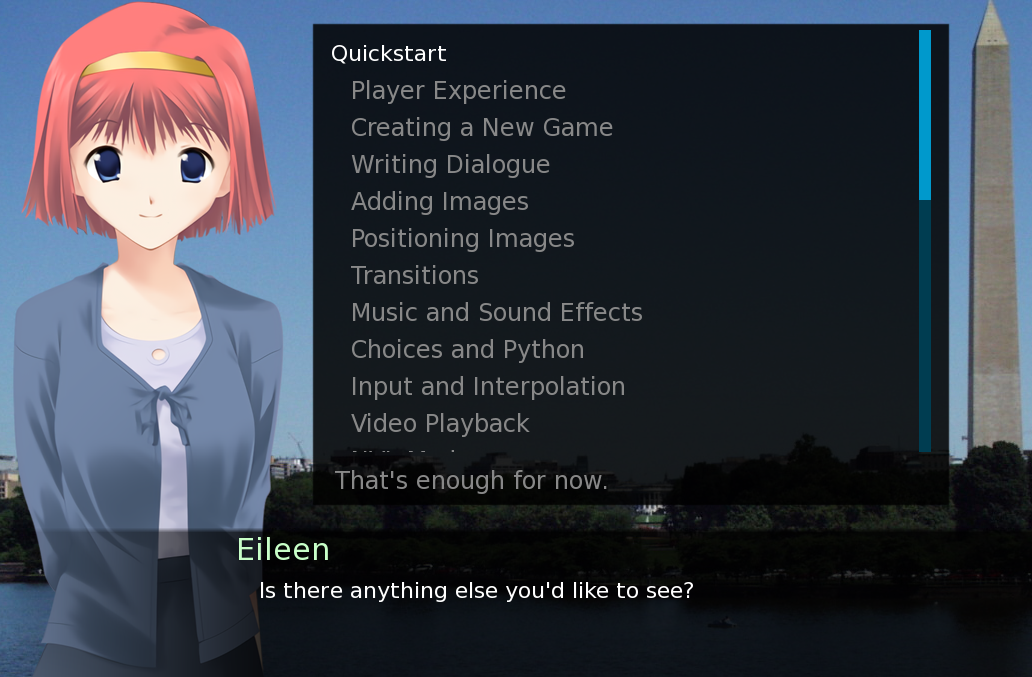
PCGamer considers some of the options in this article. In addition, there are some useful threads on Reddit, both in instructional design and gaming channels [warning not all are safe for work if you go looking]. For example it was here that I realised that many tools are combining RenPy with 3D model assets from DAZ. RenPy’s tutorial, built within the tool, is actually very good and shows how well it can work:

Screenshot from RenPy tutorial.

Challenges

A big problem for those working in corporate environments has always been the restrictions in place with regards to technology. This is why the more recent publishing tools tend to be helpful in being browser based, gone are the days where companies have needed to keep supporting old tech (including Flash) or insisting on everything being in a SCORM package.

Renpy.org requires local .exe files so is likely a non-starter for many corporate environments. Indeed the open source authoring tool but is sponsored by companies that will help you get published elsewhere, such as on games stores. Other options such as TyranoBuilder offer export to browser functionality (although Tyrano is an example with an upfront software cost so I haven’t tried it) which might be more suitable for corporates.

Therefore getting the tool installed and the games out to users to install will be a blocker for some organisations. The mobile app publication option might be a solution for some though.

Nothing new?

In many ways the learning that could be designed in RenPy and other tools is similar to narrative based eLearning in other tools and just as reliant on the quality of writing and story based learning.

This is of course nothing new, indeed conferences for eLearning and games based learning are long running:

What should we use?

With time to learn them, these authoring tools become very powerful. However, the challenges of installation and publication would likely block many corporates/organisations from using them.

Personally, I am going to try and go deeper into Ren.Py in part as it is basically teaching you some Python language through a simple interface which I suspect might be of help in the future. In addition the option to publish to Android and iOS might offer some solutions to the desktop publication problems.

For now, the ease at which Articulate and other tools have made branching become something anyone can do (rather than expensive bespoke eLearning like it used to be) is probably the way that makes sense. However, the cost of developing on a free tool like Ren.Py is likely much lower than a fully blown interactive video experience. Therefore, there are no doubt use cases out there.

More on educational games : the example of mission1point5

Using mobile gaming technology, Mission 1.5 educates people about climate solutions and asks them to vote on the actions that they want to see happen.

https://www.mission1point5.org/about

This new climate change related online activity is an interesting idea, combining a series of what are basically multiple choice questions (that give the user options for what their government should do to meet the 1.5 degree challenge) with calls to action for individual and national-level behaviour change.

Responses from your selected country will be aggregated and submitted to your government as your “vote”…

What will we do with the results?

Your vote, and those from your country, will be compiled and presented to your government to encourage bolder climate action. Votes will also be counted in a global tally. So stay tuned for the results!

https://www.mission1point5.org/about

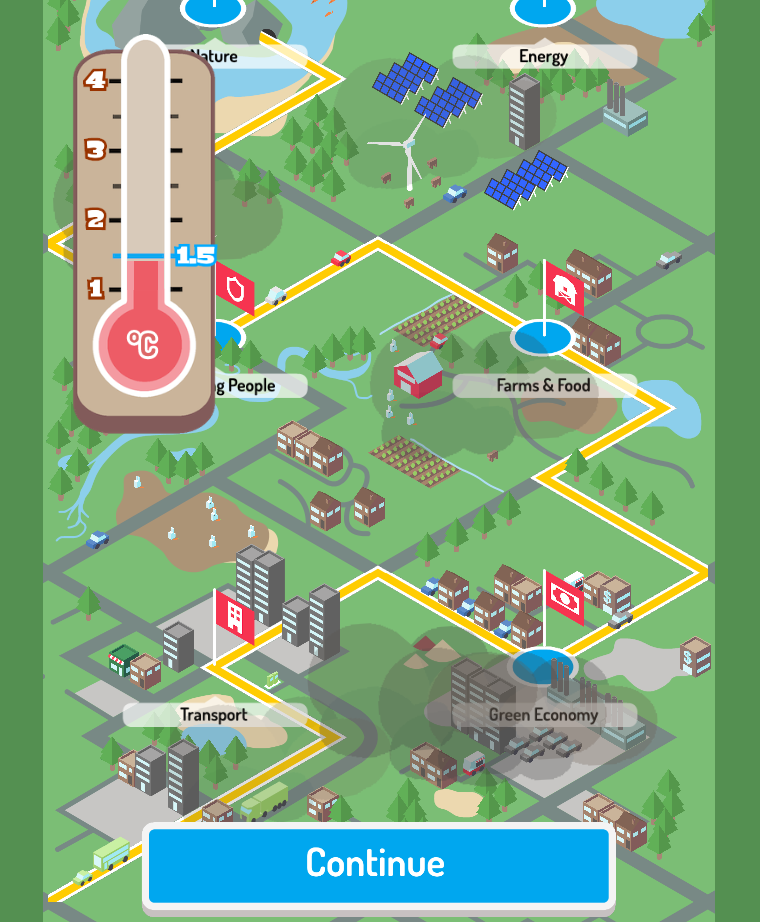
Presumably this vote piece is only prearranged with the 12 countries (plus the EU) that are listed. In addition the game mechanics themselves are a little odd given your choice for each point is really between two items as one is clearly a ‘red herring’. The onscreen results from the ‘quiz’ record 10, 700 or 1000 points depending on your answer to a question and combine into a total score for tackling the 1.5 challenge across multiple areas such as “farms and foods”, “transport”, etc.

Example question from the “Farms & Food” topic.
A section’s “vote” (which acts like a summary/debrief of the ‘correct’ answers for each section).
Overall scoring in keeping temperature change down.

Does it educate?

The first quote included above specifically states the resource “educates people”. Obviously I could write a lot here about what educating someone actually means versus learning something, etc. What I will try to focus on is if someone is likely to learn anything from the activity. The answer, of course, will be “it depends”.

If we take the cattle example, in the above screenshot, there is a lot of pre-requisite knowledge required – for example a reading level to comprehend “livestock” and “plant-based diet”, albeit with mobile-style friendly graphics as visual clues. Beyond reading ability, there is no real information on the different option and what they mean – thus the light touch to any kind of knowledge content could be confusing and if you really wanted/needed to learn something from this you would likely have to do some research away from the resource. This is not helped by the text being image based and, therefore, you can not simply select text and ask your browser to search the web for more information.

Therefore, I am tempted to say this resource might be quite useful for a school to run through in a group, i.e. with a teacher/facilitator in place to use it to foster discussion, rather than as a learning resource per se.

How could it be improved?

10, 700 and 1000 don’t obviously relate to the 1.5 degree temperature and it is not very clear from the onscreen graphics how many ‘points’ are needed as a minimum for your choices to meet your country’s requirements. Indeed there is a contradiction between not wanting to add to temperature but also needing a high score. It would be better if the scoring was somehow reversed – e.g. starting with your high carbon total and then cutting it with a % target to reach 1.5 from a high score.

There is also a risk here from oversimplifying as, presumably, the carbon impact of some choices would be more in some countries than others (this complexity might be built in but I doubt it).

The “none of the above” option on the vote really does not work either as a form of learning summary nor as a mockup of the democratic action. Particularly if the intention of the resource is for actual democratic input…

Reliable information on public opinion on climate action

This is given, in a related YouTube video’s description, as a reason for the website’s vote element:

Mission 1.5 YouTube introduction

However, it is clearly a limited activity with just three (well two) options to consider per question and then the user being very heavily prompted to select the ‘best’ option for each section’s three questions as the vote. I must admit I voted a few “none of the above” responses in a Brewster’s Millions style mood.

Summary

Overall this feels like one of those examples of where someone wants to try to achieve educational outcomes but they have limited content, a desire to reduce instruction (but to the point of irrelevance) and really only manage to leverage the gaming expertise involved (which seems considerable from the “about” page) to graphics/UI and little else. It also highlights the incredible difficulty in building content for a global audience with no personalisation or clear target audience.